Disclaimer

How to word is a free Microsoft word tutorial. Microsoft is the registered trademark of Microsoft Company, which is not affiliated with and does not sponsor or endorse the services of howto-word.com.

Showing posts with label word printing. Show all posts

How to set up a new printer in Microsoft Windows XP

If you want to print a document but you don’t have a printer connect to your PC yet. Now your printer is ready and you want to connect it to your PC you can do it just follow these steps.

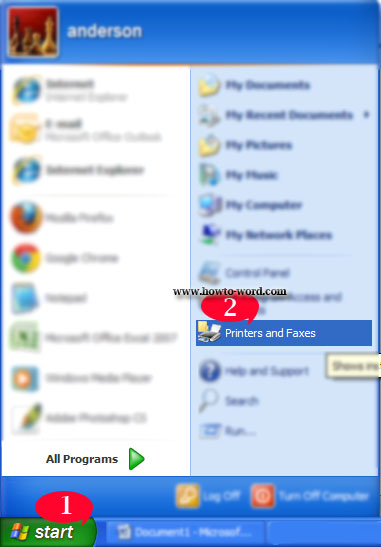
1. Click Start.
2. Click Printers and Faxes.


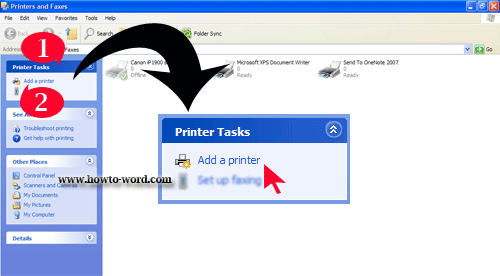
Once you clicked on ‘Printers and Faxes’ you will see the page as below.


1. under Printer Tasks
2. Click Add a printer and follow the instructions in the Add Printer Wizard – finish.

How to print multiple pages in Word


This page will show you how to print multiple pages in Word. Especially if you are using office words 2007 this tutorial is really for you. (Anyway for other versions of MS Word I think you can adapt and using this method too.)

To print multiple page in Word you need to..

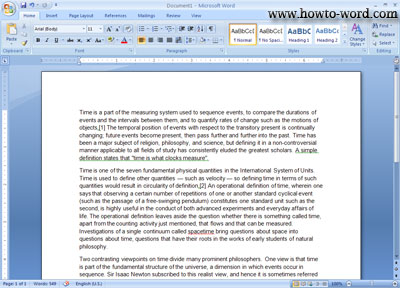
1. Open the file you want to print in MS Word 2007.


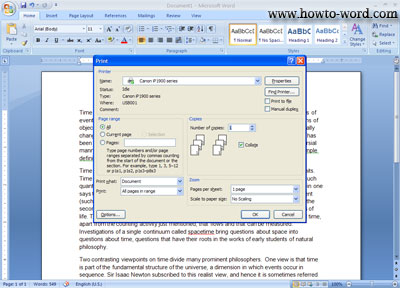
2. At your keyboard press 'Ctrl'+'P' and you will see this..


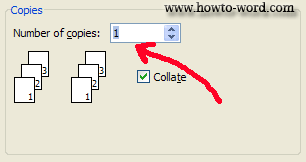
3. In put the number of copies you want to print in 'Number of copies' field.


4. Once you click 'OK' MS Word will print your document as much as you input in the 'Number of copies' field, finish.
 

Frequently Asked Questions

         
How to remove paragraph symbol in word? Help!! Try fixing it but my vertical ruler still disappear!!  
         
What is the ribbon in Microsoft Word?