
Disclaimer

How to word is a free Microsoft word tutorial. Microsoft is the registered trademark of Microsoft Company, which is not affiliated with and does not sponsor or endorse the services of howto-word.com.

Showing posts with label borders for a word document. Show all posts

How to add a border in word for a first page only

Word Border - knowledge of word document borders. As we have learnt about how to add a border in word in our last MS Word tutorial. I believe that now you can add a border in Word easily!! Most of the MS Word tutorial I give here are not difficult but however, if you don't use it often it is possible to forget it next time. If today you know how to add borders for microsoft word don't forget to review it very often!!

Add border in word
It is quite similar to how to add a border in word topic but just a little bit different as we will not add borders for microsoft word for whole document but we will do it just for the first page only!!

Yes, it's easy but if you don't do it often you may forgot it and this is how I will review it for you!!

Let's add border in word!!
1. To add borders for ms word, first of all, open your Word 2007
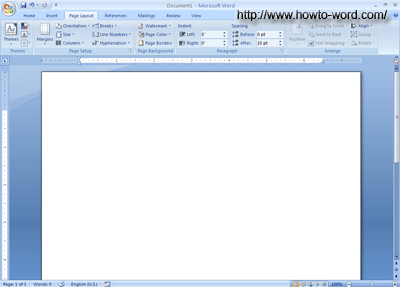
before we add border for microsoft word

2. Now what you need to do is, click Page Layout tab then click Page Borders as show in a picture below.
step of how to add microsoft word border

3.Once you click on it (as describe above) you will see this!!
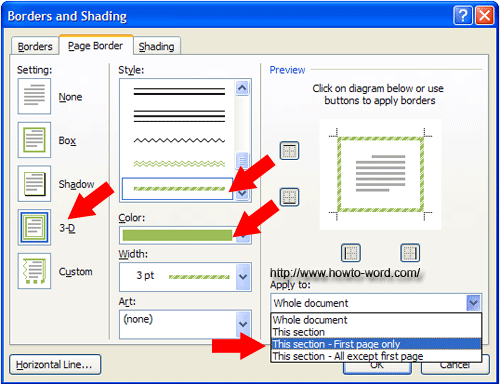
What do you want it look like?
The RED ARROW above are the topics you need to consider. If you need your border look like 3-D, just look at the Setting topic then click 3-D
Now click the Style you like, Color or Width then click OK.

Then you will get this. TADAAA..
a border for word!!
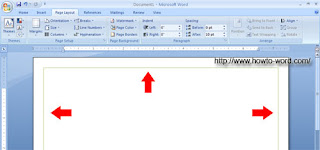
That's all for how to add a border in word for a first page only. Hope you enjoy reading and visit our site for more update in other topics again!! ^O^

How to add a border to a page in Microsoft Word 2007

Page Borders for Microsoft Word -if you need to know how to add a border especially how to add a border in word. This MS Word tutorial can help you. And this topic will show you How to add a border to a page in Microsoft Word 2007.

Page borders for microsoft word 2007
Just easy, now these are what you have to do..

1. Open MS Word 2007, now your screen should look like this.

open Word 2007 to add borders for word documents

2.Click Page Layout tab, then you will see several group and what you have to look at it specially is the Page Background group, you will see Page Borders, just click on it.

how to add page border in word 2007

3.Now your page should look like this.

Microsoft Page Borders

What is this? We called it the Borders and Shading dialog box. Normally if you open this dialog box Word 2007 will bring you at the Page Border tab. Then just click your favorite styles - This example will use.

Setting = 3-D
Style = the first one
Color = green
then click OK
Select the style you want to add borders for word documents

Once you click OK, these are borders for word that you can see.

page borders for microsoft word
To add a page borders for microsoft word 2007 is not difficult and that's all for How to add a border in word, easy right? Try it now!!
Wait!! There is not only microsoft page borders article on this site, scrolling down to try more Microsoft Word 2007 articles!!


Frequently Asked Questions

         
How to remove paragraph symbol in word? Help!! Try fixing it but my vertical ruler still disappear!!  
         
What is the ribbon in Microsoft Word?